Close
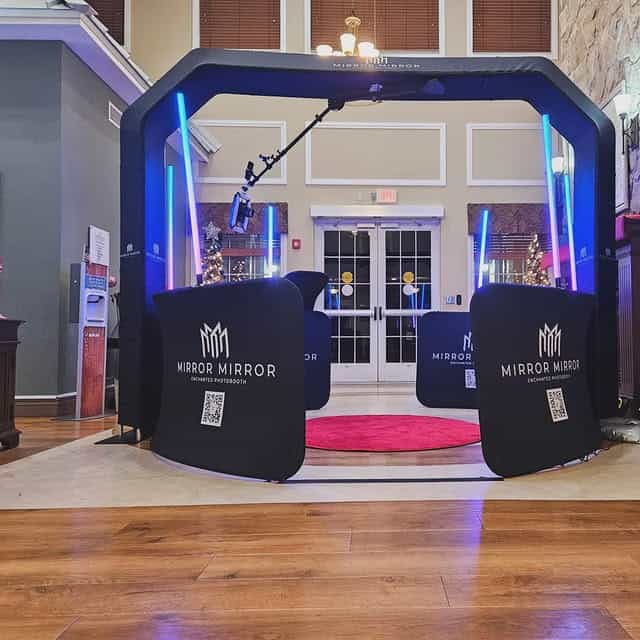
A Sky 360 video booth gives a group a shared video moment without asking everyone to gather on a raised platform. That difference matters when you picture your wedding party, colleagues, or friends taking part together. For a Florida celebration, the most useful starting point is the experience you want guests to have—and the space your venue can provide.
RMJ Entertainment’s Sky 360 Video Booth rental service uses a platform-free setup for dynamic slow-motion videos. The service page describes room for larger groups, LED lighting, fog effects, custom video designs, VIP stanchions, and sharing options. Confirm the features and operating requirements for your selected package before putting the booth into your floor plan. Here is how to turn that group-video idea into a practical event plan.
With a traditional raised-platform 360 booth, guests gather on a defined platform while a camera moves around them. The Sky 360 offers a different arrangement: participants remain on the floor within the designated capture area. The format can suit a group that wants to appear in the same clip and enjoy a little more freedom of movement.
Platform-free does not mean unlimited space or unlimited participants. The camera still needs a controlled operating area, and the team needs room to guide sessions. Ask RMJ to confirm the suitable group size, clearance, and entry route for the actual setup. Avoid promising that your entire wedding party or department will fit into one video before that conversation.
Choose a simple idea that people can understand quickly. A wedding group might share a coordinated wave or celebrate with the couple. Colleagues could pose together after a company presentation. Friends at a birthday party might turn toward the camera and cheer for the guest of honor. These are creative starting points to discuss with the team, not instructions to improvise around moving equipment.
Keep the motion comfortable and let the booth team direct participants. Matching gestures usually need less explanation than a complicated routine. Make space for guests who would rather watch or take part with a smaller group. If anyone has mobility or sensory considerations, describe those needs in advance so the provider and venue can discuss a suitable arrangement; a floor-level format alone does not establish that every setup is accessible to every guest.
Treat the booth as an activity area, not a piece of equipment that can be squeezed into leftover space. Ask for the current footprint and overhead clearance, then add room for guests to approach, wait, and leave. Show RMJ and the venue the proposed location before finalizing tables, lounge furniture, or nearby entertainment.
A useful floor-plan conversation covers the capture area, camera movement, barriers, entrance, and exit. Keep the waiting group away from catering routes and emergency access. Do not position the booth where guests must cross its operating area to reach a bar or restroom. Discuss power, installation access, and any restrictions with the venue rather than guessing what the equipment will need.
For outdoor Florida events, confirm whether the proposed location and conditions are suitable, along with weather and backup arrangements. Ground conditions and shelter matter as well as the forecast. If your event will move between spaces, explain that early so setup and guest flow can be planned realistically.
Think through what a guest sees when approaching the booth. A clear gathering point and a short explanation help people know when to step forward. Discuss how the team will form groups and guide participants out after each capture. Leave a separate place for anyone who needs help with sharing so they do not hold up the next group.
The service page lists instant sharing options, but confirm the selected delivery method and any connectivity requirements for your venue. Ask how guests receive their finished clips and how delivery questions are handled. Do not promise that every guest will receive a video immediately regardless of network conditions. Also confirm whether and how the event host receives the final collection after the celebration.
A custom design can make each clip feel connected to your event. A wedding might use the couple’s names and date; a corporate celebration might use a logo and event title. Keep those elements readable while leaving the people in the video easy to see. A busy border can compete with the movement that makes the format appealing.
Send names, spelling, dates, logos, and any requested brand colors early enough for review. Ask RMJ which design choices apply to the selected package and how approval works. Confirm any music or special editing request rather than assuming it is included. If your business plans to reuse guest clips publicly, arrange appropriate guest permission for that use; guests should be free to enjoy the activity without being required to post on social media.
LED lighting and fog effects can contribute to the look described on the Sky 360 service page. Their use still needs to fit your event and venue. Ask whether the venue permits the planned effects and whether any coordination is needed with its staff. Confirm the available setup with RMJ before advertising a particular effect to guests.
Your room lighting should support the overall atmosphere and the video area. Our event uplighting planning guide offers ideas for that discussion. Schedule booth participation during a social portion of the event, with pauses around speeches or formal activities if needed. A well-placed invitation from the host or DJ can help guests find the booth without interrupting the main program.
Choose the format around your priorities. If you are comparing the Sky setup with a conventional 360 experience, our Central Florida 360 booth planning guide provides useful questions about timing and guest participation. Confirm the specific space and group arrangements for each option instead of treating all 360 booths as the same setup.
If bringing the camera directly to mingling guests matters more than a dedicated video station, the Ring Roamer guest-experience guide describes another approach. Each format has a different role. You do not need to add multiple experiences unless the audience, event schedule, and budget support them.
The service is designed to offer larger groups more room than a raised-platform arrangement. Ask RMJ for the appropriate participant limit for the actual setup and venue. A numerical capacity should come from the provider, not an assumption based on a photograph.
Share the date, venue address, event type, approximate attendance, preferred coverage period, and a floor plan or photos of the proposed area. Mention indoor or outdoor placement, access restrictions, and the kind of group videos you have in mind. RMJ serves Central Florida and beyond; confirm the service and travel arrangements for your particular Florida location.
The service page describes these features, but your quote should confirm the exact inclusions, venue requirements, and design approval process. Ask about any requested additions before making promises to guests or including them in your event materials.
A Sky 360 video booth works best as a clearly planned part of the celebration. Give the team a workable location, give guests an easy way to join, and confirm the capture and sharing details in advance. The result you are planning for is simple: people enjoying a shared moment that feels like your event.
Compare RMJ’s event entertainment experiences or check availability for your event date. Tell the team about your venue and group-video ideas so they can help you choose the right arrangement.
Your group: Describe who will take part and the kind of video moment you want.
Your space: Confirm the footprint, overhead clearance, access, and guest routes.
Your design: Review names, dates, logos, and package-specific video options.
Your next step: Share your event date and venue with RMJ to confirm availability and setup details.
Explore our Sky 360 Video Booth rental and event entertainment experiences, then check your event date with RMJ.